Mistral's Vibe assistant, formerly Le Chat, for chat, research, document work, coding sessions, and connected tasks.
Best for: AI chat and Web search
Chatbots & AssistantsAI Agents & Workflows
About this listing
Official documentation reviewed; examples are illustrative. No hands-on performance claim.
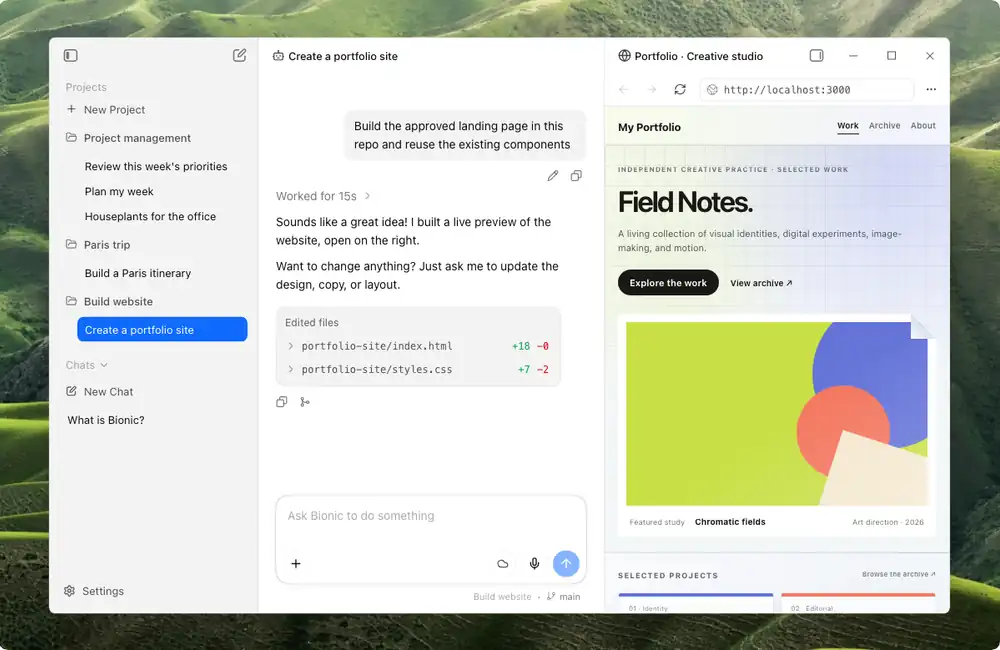
Official sourceLM Studio runs downloaded models on your desktop and offers the Bionic agent for work with local files.
Best suited to
Desktop local AI and model experiments
LM Studio runs downloaded models on your desktop and offers the Bionic agent for work with local files. Local inference and optional cloud features have different costs and data paths.
Best for: Desktop local AI and model experiments.
Illustrative input: Turn this note into three tasks: choose a palette, review two page layouts, confirm the launch checklist.
Illustrative expected result: Three bounded tasks traceable to the supplied note, without added owners or dates. This is an editorial example, not a recorded vendor test. Check it against your original material before using it.
The free plan covers local models and local Bionic features. Bionic+ is listed at USD 20/month; cloud allowances and add-on credits apply separately.
Large models need sufficient memory and disk space. Start with the smallest useful task; keep the original input and compare the result before committing to a larger workflow.
HuggingChat: use hosted chat without local model setup. Mistral Vibe: compare a coding-focused agent.
Reviewed 9 October 2026 against official product documentation and official pricing / access terms. Feature access and prices can change; the linked provider terms govern your account.
Local model downloads
Desktop chat
Bionic agent
Local voice transcription
MLX support
llama.cpp support
Optional cloud models
The free plan covers local models and local Bionic features. Bionic+ is listed at USD 20/month; cloud allowances and add-on credits apply separately.
Plan information can change. Prices and conditions are set by the provider. Information checked 2026-10-09.
Source for access detailsOne email a week with pricing and feature changes in this category. No per-tool price alerts.
By subscribing you agree to receive this email from Genius Forges and to us storing your address to send it. We may ask you to confirm by email. Every email has an unsubscribe link. See our privacy policy.
LM Studio runs downloaded models on your desktop and offers the Bionic agent for work with local files. Local inference and optional cloud features have different costs and data paths.
The free plan covers local models and local Bionic features. Bionic+ is listed at USD 20/month; cloud allowances and add-on credits apply separately.
Check the supported download and model memory requirements Download a small compatible model and load it locally Ask it to outline a fictional project note Disconnect network access and repeat the text-only task if testing offline use
Large models need sufficient memory and disk space Cloud features introduce separate usage limits and a different data path
HuggingChat: use hosted chat without local model setup. Mistral Vibe: compare a coding-focused agent.
Tell us what needs improving. No account or private output required.
Report incorrect information or a broken linkDocumentation-based review · 2026-10-09
Original editorial guidance based on linked official sources; sample inputs and outputs are illustrative.
Mistral's Vibe assistant, formerly Le Chat, for chat, research, document work, coding sessions, and connected tasks.
Best for: AI chat and Web search
Hugging Face's chat interface for exploring open-model assistants with automatic or manual model selection.
Best for: Exploring community and open-model chat assistants
Backend for coding agents: model access, user login, Postgres and file storage under one project key, with a $0 starter.
Best for: Vectoree is for developers and teams whose coding agents, such as Cursor, Claude Code or Codex, build apps that need a backend.
On Product Hunt
External community signal. Not our editorial ranking.