
The useful result
Explain a formula fix and prove it against a small expected result before copying it to a larger sheet.
- Explain a formula fix and prove it against a small expected result before copying it to a larger sheet.
“Fix my spreadsheet” is too broad to diagnose reliably. A small table, the current formula and an expected result give an assistant a problem you can inspect.
This lesson uses a fictional Google Sheets SUMIF example. Google's function reference documents conditional sums and argument order. The arithmetic below is manually checkable; it is not a report of a live AI or spreadsheet run. Keep production data out of the initial test.
Before you start
- A scratch sheet or a plain-text table with row and column labels.
- A known expected result for the sample.
Review evidence
Documented hands-on review · 2026-10-07
One observed ChatGPT web run on a fictional five-row fixture; exact model version unavailable. Totals independently checked. No executed spreadsheet or cross-platform benchmark is claimed.
Build a three-row example
Use headers in row 1: Category in A1 and Amount in B1. Enter Travel / 40 in row 2, Meals / 20 in row 3 and Travel / 60 in row 4. The expected total for Travel is 100.
Write the actual formula and describe its wrong result or error message. Do not ask the model to infer the layout from unlabeled numbers.
Example / expected result
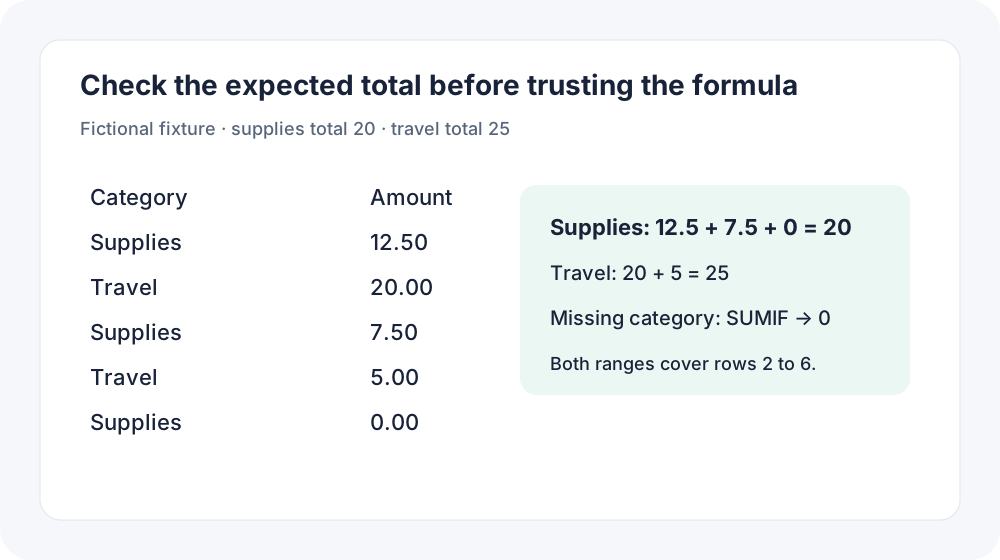
Use the downloadable five-row expense CSV. Supplies: 12.50 + 7.50 + 0 = 20. Travel: 20 + 5 = 25. A missing category totals zero with SUMIF.
Check your result
Confirm every cell reference matches your scratch table and that the expected answer was calculated independently.
Request an explanation and a bounded fix
Provide your spreadsheet platform because syntax and available functions can differ. Ask the assistant to explain each argument so you can detect a reversed range.
I use Google Sheets. Headers are in A1:B1.
A2=Travel, B2=40; A3=Meals, B3=20; A4=Travel, B4=60.
I need the total Amount where Category equals Travel: expected 100.
My formula is =SUMIF(B2:B4,"Travel",A2:A4).
Explain why it is wrong, propose a corrected formula and explain every range.
Do not edit my real spreadsheet.
Example / expected result
Observed ChatGPT web answer, 7 October 2026: =SUMIF(A2:A6,E2,B2:B6). Supplies: 20; Travel: 25; Missing: 0. The model warned that text amounts and trailing spaces need cleaning. The fictional totals were independently checked; Google Sheets was not executed.
Check your result
Check that the criterion range contains category text and the sum range contains numeric amounts.
Test before expanding the range
Apply the formula in the scratch sheet and confirm 100. Change the criterion to Meals and expect 20. Then test a category that is absent and inspect the result.
Only after the small tests pass should you extend the ranges to your real table. Keep ranges aligned and check whether amounts are stored as numbers or text.
Example / expected result
Expected checks for the synthetic data: Travel=100; Meals=20; no matching category=0. These are arithmetic expectations, not captured application outputs.
Check your result
Observe the actual scratch-sheet results and inspect one real-data sample manually before broad use.
When it goes wrong
Locale settings can change separators. Numbers stored as text, hidden spaces in categories and mismatched ranges can cause unexpected results. A plausible formula may still answer the wrong question. Do not overwrite a production sheet while diagnosing.
Make it your own
Add a fourth synthetic transaction and calculate the expected totals by hand. Verify that the corrected formula follows the new data and still excludes other categories.
Useful next resources
Sources and review
Last checked Oct 7, 2026. Features and account limits can change. Verify important results against your original material.
Did this help you complete your task?
Tell us what needs improving. No account or private output required.
Report incorrect information or a broken linkGenius Forges Editorial
AI-assisted editorial lessons researched using linked primary sources. Worked examples are illustrative unless a live test is explicitly documented.


