Cart 0
AI Prompt Packs

Sound Like You, Check Everything

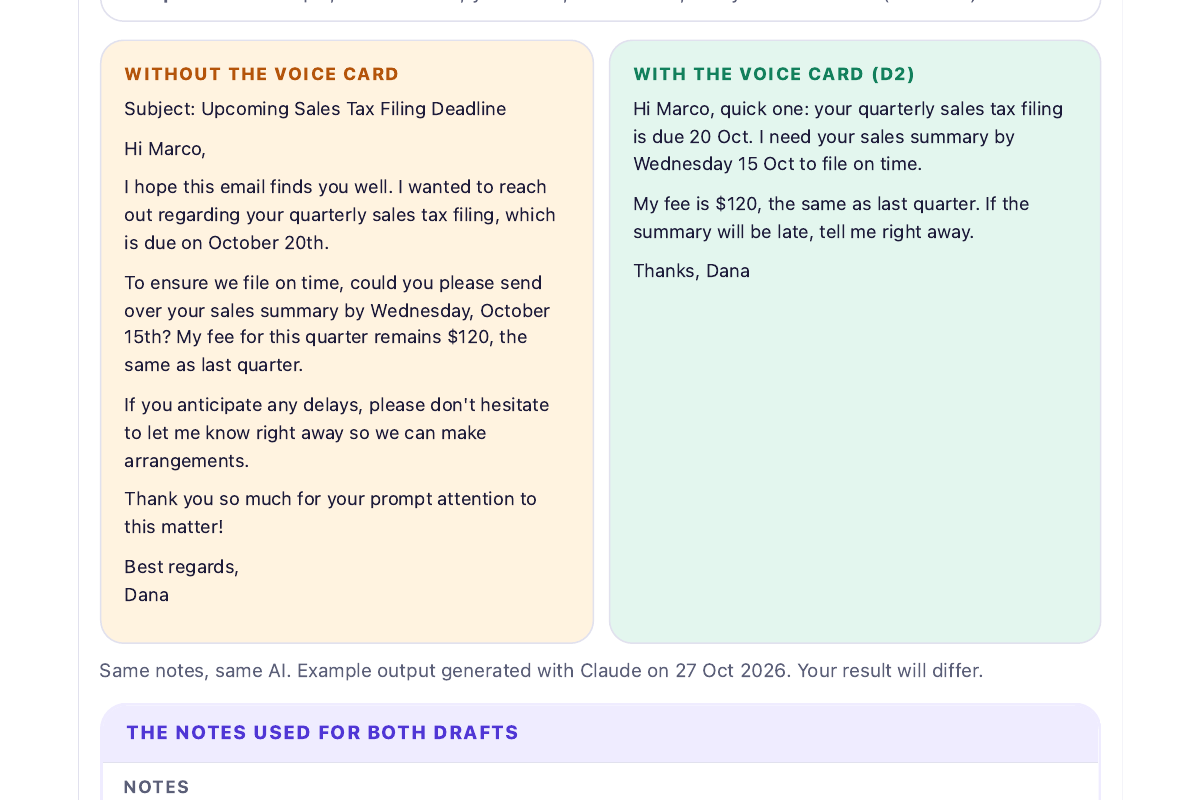
A 30-minute setup that makes AI write in your voice, plus a checking routine that shows what to verify before you send. 35-page guide (PDF and HTML), 16 prompts written and tested with Claude, a Voice Card builder that needs no AI, 4 printable cards and a verification spreadsheet.

Digital downloadPDF + HTML + TXT + XLSX / ZIPVersion 1.0

What you’ll get

These files and resources are included in your download.

  • 35-page illustrated guide as a PDF and as an interactive HTML page with copy buttons, tick boxes and a progress bar (works offline)
  • 16 copy-and-paste prompts in 5 chapters, each with when to use it, what to provide and a check before you send (also as ALL-PROMPTS.txt)
  • Voice Card builder inside GUIDE.html: 12 quick questions build your card with no AI needed
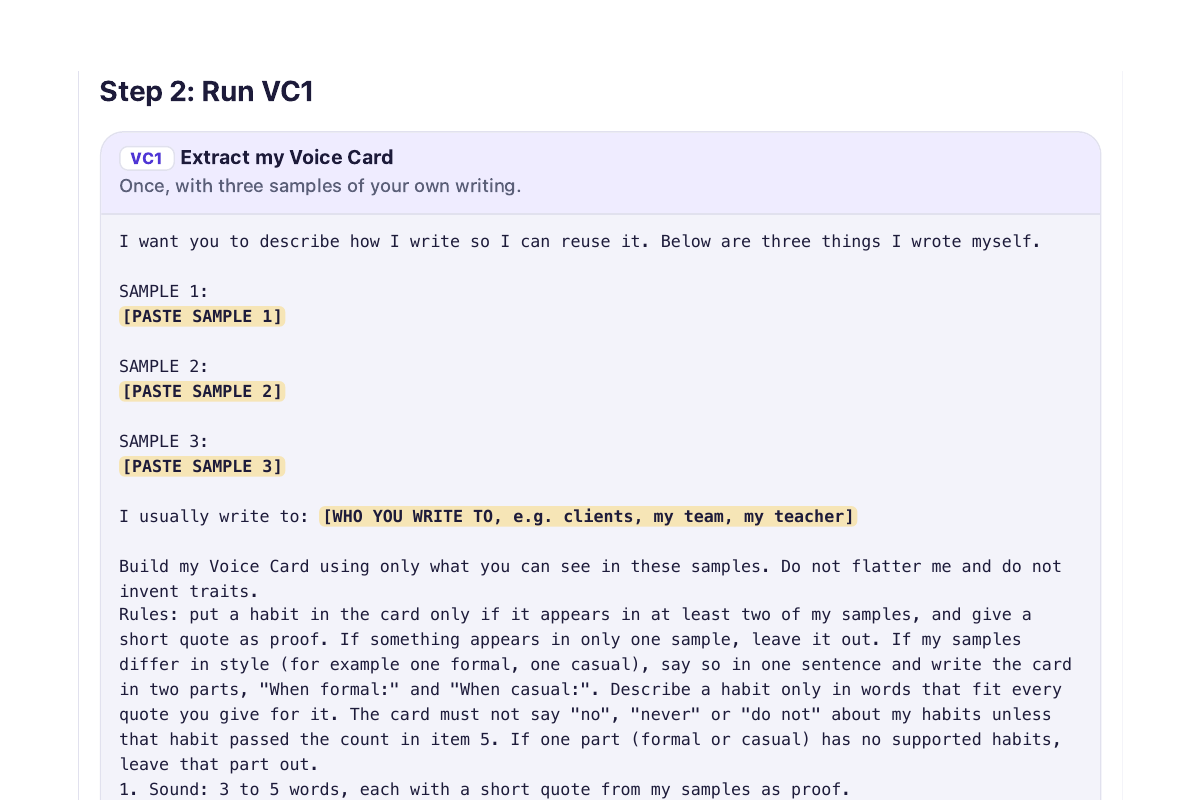
  • Voice Card prompts: describe your style from 3 of your own writing samples, then test the card
  • Six drafting prompts that keep your numbers, names and dates exact: interview first, email from notes, post or update, rough notes to draft, shorten, change tone
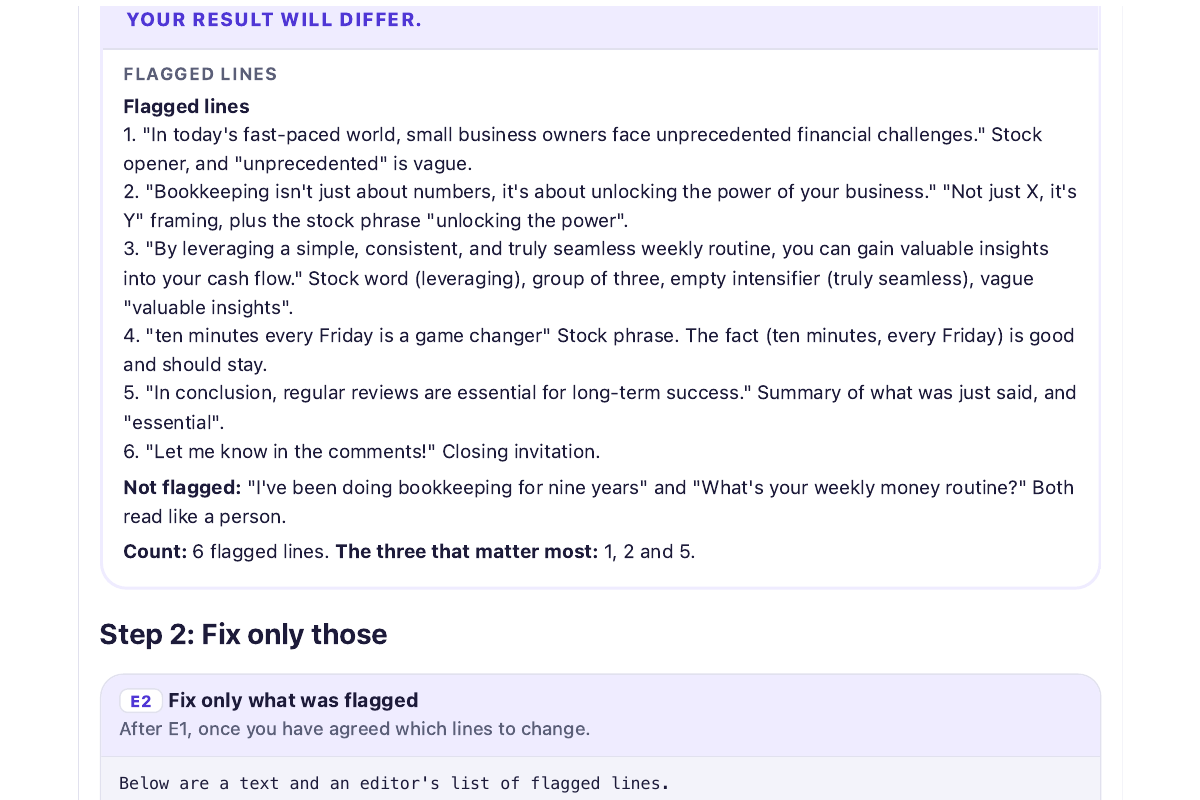
  • AI-tells editor: mark the lines that read like stock AI writing, then fix only those, with a table of 20 common patterns
  • Checking routine: quote first, list every claim, critic mode, no-flattery feedback, and a 5-minute manual check
  • Long-chat rescue: a handoff summary and a restart prompt for when a chat starts ignoring your rules
  • Worked examples with fictional inputs, generated with Claude on 27 Oct 2026 (your results will differ)
  • 4 one-page printable cards: Voice Card, AI-tells checklist, verification card, restart-a-chat card
  • Verification log spreadsheet that shows which kinds of claim your AI gets wrong most often
  • banned-phrases.txt: over 70 phrases that often make text sound generic, as a search list
  • Three short routines: an email in 3 minutes, an AI-written report in 15, study notes in 15

Who it's for

A good fit if

  • People who use an AI chat for emails, reports, posts or study notes and are tired of text that sounds like nobody in particular.
  • Freelancers and small-business owners who send client emails, updates and reminders written with AI help.
  • Students and workers who hand in or send AI-assisted drafts and need every number, date and quote to be right.
  • Anyone who has caught an AI stating something false with total confidence and wants a simple routine to catch it earlier.
  • Beginners: no tech skills are needed and a free AI chat is enough.

Probably not for you if

  • Anyone looking for a way to make AI text pass an AI detector. Detectors are unreliable and this kit gives no tricks for them.
  • Anyone who wants an app or a plug-in. This is a guide, prompts and printable files, not software.
  • People who need medical, legal, tax or investment advice. Ask a professional for those.
  • Developers looking for API, coding or automation prompts.

Before you buy

What you need

Written and tested with Claude (27 Oct 2026). Plain-text prompts built for any chat assistant; not tested in ChatGPT or Gemini

GUIDE.html opens offline in any modern browser; GUIDE.pdf in any PDF reader

Spreadsheet works in Excel, Google Sheets or Apple Numbers

How you can use it
For your own use, or inside your own single-owner business. You may edit and print the prompts and templates for your own work. Do not resell, share or redistribute the files. One purchase covers one person. AI services you use have their own terms. Read the license

Preview the product

Download free preview

See a sample of the material before choosing your pack.

Look inside

  • Sound Like You, Check Everything preview 1 of 4
  • Sound Like You, Check Everything preview 2 of 4
  • Sound Like You, Check Everything preview 3 of 4
  • Sound Like You, Check Everything preview 4 of 4

Tap an image to open it larger.

Read the sample
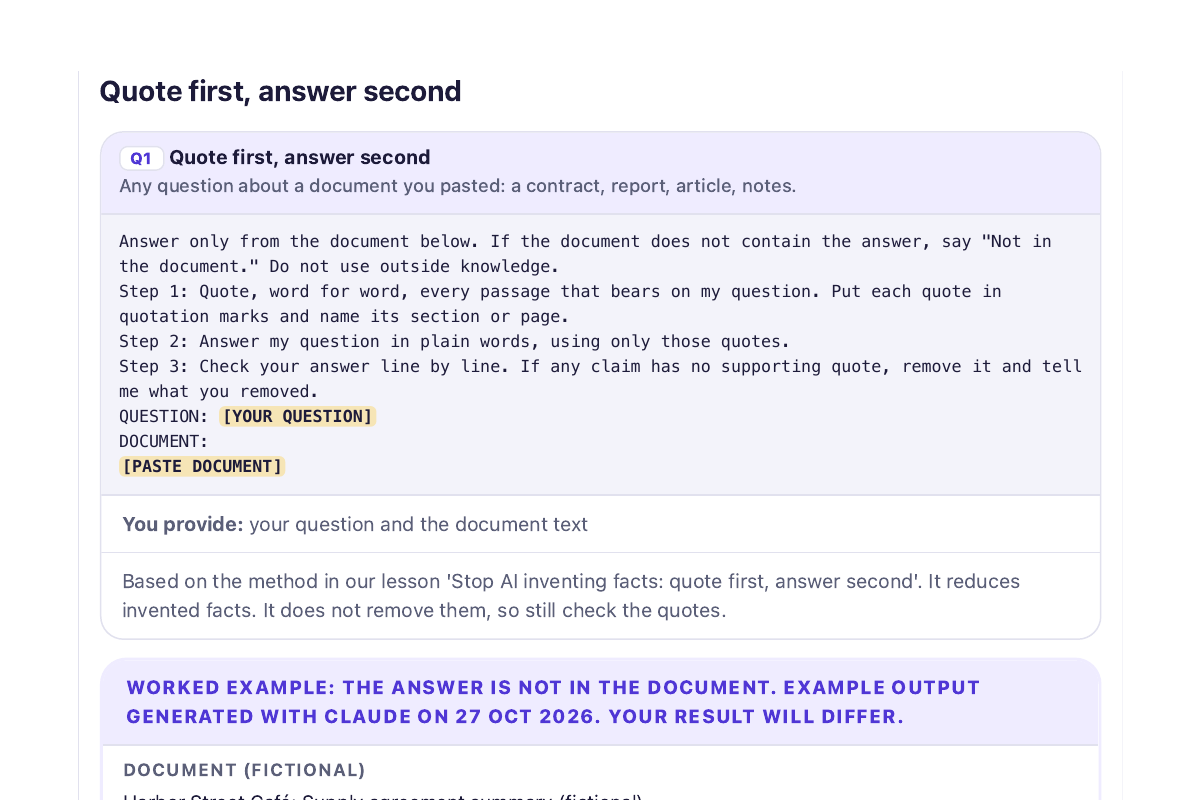
PROMPT Q1: Quote first, answer second
(Use it on any contract, report or article you paste into the chat.)

Answer only from the document below. If the document does not contain the answer, say "Not in the document." Do not use outside knowledge.
Step 1: Quote, word for word, every passage that bears on my question. Put each quote in quotation marks and name its section or page.
Step 2: Answer my question in plain words, using only those quotes.
Step 3: Check your answer line by line. If any claim has no supporting quote, remove it and tell me what you removed.
QUESTION: [YOUR QUESTION]
DOCUMENT:
[PASTE DOCUMENT]

WORKED EXAMPLE (fictional document). Example output generated with Claude on 27 Oct 2026. Your result will differ.

DOCUMENT
Harbor Street Café: Supply agreement summary (fictional)
1. Deliveries: Tuesdays and Fridays before 8 a.m.
2. Minimum order: $150 per delivery.
3. Payment: Invoices are due 30 days after delivery.
4. Prices: The supplier may change prices with 30 days' written notice.
5. Returns: Damaged goods must be reported within 24 hours of delivery and will be credited on the next invoice.

QUESTION
What is the late-payment fee?

WHAT Q1 RETURNED
Step 1: Quotes
- "Invoices are due 30 days after delivery." (Section 3, Payment)
No other passage mentions fees, interest or penalties for late payment.

Step 2: Answer
Not in the document. It says when invoices are due, but it does not say what happens, or what fee applies, if payment is late.

Step 3: Check
My answer makes two claims: invoices are due after 30 days (supported by the quote), and no late fee is mentioned (I found no passage about it). I removed nothing.

The answer is "Not in the document." That is the point: the prompt gives the AI permission to say so, instead of inventing a fee.

How to get started

  1. 1

    Open GUIDE.html (or the PDF) and collect three short things you wrote yourself. Run the first prompt to build your Voice Card. It takes 15 to 20 minutes and you do it once.

  2. 2

    Save the Voice Card where your AI app keeps permanent instructions, then draft from your own facts with the drafting prompts.

  3. 3

    Before you send anything, run the AI-tells editor and the checking routine, and log what you checked.

Tips for checking your results
  • Read and edit every AI draft before you send it. You are responsible for what goes out under your name.
  • Check names, numbers, dates and quotes at the original source. The prompts make mistakes easier to see; they do not remove them.
  • Do not paste passwords, ID or bank numbers, health details or confidential work documents into an AI chat.
  • AI detectors are unreliable and this kit offers no way to beat them. Follow your school's or workplace's rules on AI use.
  • Not medical, legal, tax or investment advice. Prompts were tested with Claude; other apps and plans can behave differently.
Updates & support
Updates
One-time purchase of version 1.0. If we find a mistake or a menu name has changed, we will fix it and email you the corrected file. Future editions are not promised. Keep your own copy: downloads stay available for 30 days.
Support
Email [email protected] with questions about the files or a mistake you found. Personal coaching and custom writing are not included.
Last updated
October 28, 2026

Keep learning for free

Practice the skill first, and choose a kit when you need the editable files.

Frequently asked questions

What do I get when I buy?

One ZIP file with a 35-page guide as a PDF and as an interactive HTML page, 16 prompts as plain text, four one-page printable cards, a verification spreadsheet and a list of phrases that often make text sound generic. Everything works offline.

Which AI apps does it work with?

The prompts are plain text, written and tested with Claude on 27 Oct 2026. They are designed to work in ChatGPT, Gemini and similar chat assistants, but we have not tested every app or plan, and free plans can behave differently from paid ones. Menu names change often, so the guide says when we checked them.

Will it make my writing pass an AI detector?

No. No tool can reliably tell whether a person or an AI wrote a text, and detectors give false flags. The kit does not promise or teach ways to beat detectors. It helps you write in your own voice and keep your facts right. If you are asked about AI use, follow your school's or workplace's rules.

Will the AI still make mistakes?

Yes. The checking routine makes mistakes easier to see: it makes the AI quote its evidence, list the claims to check and challenge its own answer. You still check names, numbers, dates and quotes at the source before you send anything.

Is it safe to paste my writing into an AI chat?

Only paste what you are comfortable sharing. The guide starts with what never to paste (passwords, ID or bank numbers, health details, confidential work documents) and how to swap real names for made-up ones. Check your AI app's data settings too.

How long does it take?

About 30 minutes to set up: 15 to 20 minutes for your Voice Card, once. After that, drafting and checking take 2 to 5 minutes per task.

Can I try it first?

Yes. Read the sample on this page, or get the free Sound-Like-You Starter, which has three of the prompts with a worked example for each.

Can I get a refund?

Yes, in these cases: you ask within 7 days and have not downloaded the files; the files are broken or are not what this page describes; or you were charged twice. We usually do not refund a change of mind after download, or because AI output differed from what you hoped. EU and UK buyers confirm immediate access at checkout. We reply within 3 working days. See the refund policy.
Customer reviews

No published reviews yet. Customers can share feedback from My Downloads after using the resource.

Related resources

We use optional cookies for analytics and referral tracking. Learn more about our privacy policy